Superdock
See Chrome Profiles
in your macOS Dock.
macOS hides every Chrome profile behind one icon. Superdock gives each one its own, with its own picture.
Work, personal and client. Three icons, not one.
One app, one icon. That is why work, personal and client all hide behind the same Chrome. Superdock splits them, each with its own picture. Click one, get that profile's windows.
Every other app: hover to see inside.
Chrome profiles get their own icons. Everything else gets a picture of each open window when you hover it. Editors show the project name, not the file. macOS has no equivalent.
Alt-Tab, the way Windows does it.
Hold Option-Tab. Every window appears as a picture, minimised ones included. Command-Tab only shows apps, so the second window is a guess.
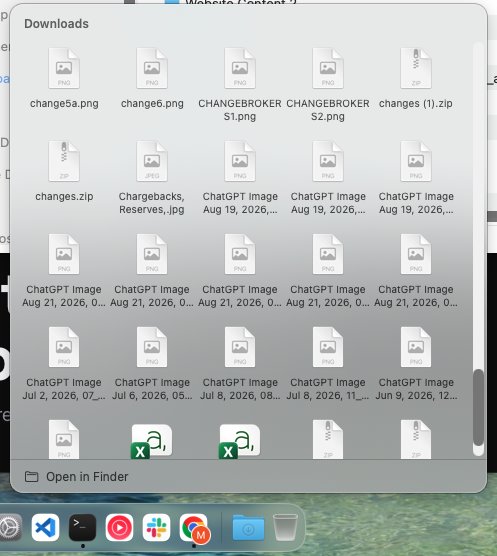
Folders open where you click them.
Click a folder, its contents open above it, newest first. Downloads is there from the first launch.
Mission Control, one click from the dock.
Click the space right of the dock for Mission Control, left of it for Stage Manager. Pick what each side does. No hot corners, no shortcuts.
A dock on every screen.
A second monitor gets its own dock, showing what is actually open on that screen. No reaching across.
It looks exactly like the Dock you already have.
Same icon size, same spacing, same glass. Nobody will notice you swapped it.
I made this for myself first.
I came to the Mac from Windows. On Windows, every Chrome profile was its own button in the taskbar. Client work here, my own accounts there. One glance, one click.
On the Mac they all became one icon.
So every switch turned into a hunt. Click Chrome, get the wrong window, open the profile menu, wait, lose my place. Forty times a day.
Every fix I found ran a second copy of Chrome. Sign in to everything again, pay for it in memory. That is a trade, not a fix.
I wanted my Chrome, untouched, with one icon per profile. So I built it.
Then I kept going, because the same problem kept turning up elsewhere. A switcher that shows windows, not apps. A dock on every screen. Dock ends you can click for Mission Control.
I use it every day. If something is missing or broken, email me at sayyedmk15@gmail.com and it comes to me, not a queue.
One price. Yours to keep.
The dock is free, forever. Chrome profile icons are one purchase after a 14-day trial, no card.
- Every profile its own icon
- Window previews and overview
- Use on up to 5 of your Macs
- Every future update included
- No subscription, ever
Teams and agencies, volume pricing available. Get in touch.
What you are installing
Superdock asks for one permission, so it can see your windows. Here is what it does with that, and what it never does.
- It never watches youNo analytics, no tracking. The app never sends anything about what you run.
- No sign-upNo account, no email, no login. Download it and it works.
- Apple checked itSigned and notarized, so it opens with a double click. No scary warning.
- Works offlineYour licence is checked on your Mac. Lose your connection and nothing stops.
- Chrome stays as it isNo second copy of Chrome, no new data folder. Same logins, same memory.
- You can email meOne developer, real name, public GitHub. Your email reaches me, not a queue.
No testimonials here yet. Superdock launched in September 2026 and I would rather show you nothing than invent quotes. If you use it, tell me what you think and I will put real ones here.
Questions people ask
What is Superdock?
Superdock is a replacement for the macOS Dock. It draws its own dock, so it can do the one thing the built-in Dock cannot: show a separate icon for every Google Chrome profile, each with that profile's avatar, its own window list and its own hover previews. Everything else stays as you know it. Your pinned apps, the Trash, running-app dots, drag to reorder, drag off to remove, the running dot and the glass panel are measured against Apple's Dock to the pixel. The system Dock is hidden while Superdock runs and comes back the moment you quit. It also adds what Windows switchers miss: an Alt-Tab style window switcher, a dock on every display that shows the apps with windows on that display, and clickable dock edges for Mission Control and Show Desktop.
How is this different from running separate Chrome instances?
Other tools give each profile its own Dock icon by launching a separate copy of Chrome with its own data folder. We measured that: one Chrome with three profiles and about 35 tabs used 1.67 GB across 11 processes, while three separate instances of the same thing used about 4.6 GB across 33. That is 2.8 times the memory, and you sign in to every account again inside each copy. Superdock leaves Chrome alone. All your profiles keep running in the one Chrome process you already have, sharing memory and logins, and Superdock works out which window belongs to which profile from the window title and Chrome's own profile list. The result is one icon per profile in the dock, with only that profile's windows behind it, and no second Chrome anywhere.
Do folders and the Downloads stack still work?
Yes. Click a folder in the dock and its contents open above it, as a grid or a list, whichever you choose in its right-click menu. Folders come first, then files. Click an item to open it, or open the folder in Finder from the bottom of the panel. Superdock inherits the folders already in your Dock, and adds Downloads on the first launch if you have none.
What does Superdock cost?
The dock is free to download and stays free. The Chrome profile icons are $7.99, once, after a 14-day trial. The launch price is discounted from $13.99. There is no subscription, and every future update is included. One licence covers up to five Macs you own; you can remove a Mac from the licence at any time in Settings or on the manage page. The dock itself is free to use forever; the licence is needed for the Chrome profile icons after the 14-day trial, which needs no account and no card. Payment is handled by Lemon Squeezy as merchant of record, and the licence arrives by email within a minute.
What does it need to run?
A Mac running macOS 14 Sonoma or later, on Apple silicon or Intel. Superdock asks for one permission, Accessibility, so it can see other apps' windows; without it there are no window lists, previews or profile icons. Screen Recording is optional and only adds live window thumbnails to previews and the switcher. The app is signed with an Apple Developer ID and notarized, so it opens with a double-click and updates itself over a signed feed.
Does it change how my Mac looks?
No. Icon size follows your Dock size setting, and the dock's glass, spacing, running dots and icon sharpness were matched to Apple's Dock by measuring screenshots pixel by pixel. Light and dark mode, the macOS 26 icon styles and the wallpaper showing through the glass all behave as with Apple's Dock. Magnification is available and off by default, like Apple's.
Updated 3 September 2026, for Superdock 1.0.3.